RFI AI vs Procore AI: honest comparison.
Both tools claim to slash RFI turnaround. We get asked the difference on almost every discovery call, so here's the version we'd give over coffee, without the marketing.
By the Marapone team · Updated September 2026
What each one actually does
Procore's RFI AI is a feature inside the Procore platform. It reads RFIs that already live in your Procore project, suggests responses based on similar past RFIs and the spec book you've uploaded, and helps you route the question to the right consultant. It's good. It works the day you turn it on.
A custom Marapone RFI build does similar work, but starts from a different premise: the RFI workflow doesn't actually live cleanly in Procore for most GCs. It lives partly in email, partly in attached drawing markups, partly in voicemails from the super, and partly in the spec book PDF the consultant hasn't loaded yet. Marapone ingests across all of those and reasons over the whole pile.
Where Procore AI wins
If your shop is Procore-native — every RFI is opened in the Procore module, every consultant logs in to respond, every drawing reference is hyperlinked — Procore AI wins on speed-to-value. There's nothing to deploy. There's nothing to integrate. You toggle it on and it starts suggesting drafts.
It also wins on consultant-side adoption. If your structural and mech consultants are also in Procore, the AI's suggested responses sit in a workflow they already know. They click "approve" or edit; nobody has to be retrained.
Quick test:
Open your last 50 RFIs. If 90%+ of them were created and answered without anyone leaving Procore, Procore AI is probably the right tool.
Where Procore AI stalls
Three patterns we see consistently:
1. Drawings live elsewhere. Many GCs use Bluebeam Studio or shared SharePoint folders for the working drawing set. The consultant marks up the PDF in Bluebeam, then emails it back. Procore AI doesn't see those markups unless someone manually re-uploads them, and they rarely do.
2. The spec book is huge and unindexed. A 4,200-page commercial spec book is hard to search, and Procore AI's retrieval is opinionated about how the spec is structured. Sections out of order or non-CSI numbering trips it up.
3. Email is where the real Q&A happens. The official RFI is the third email in a six-email thread between the PE and the architect. Procore AI sees the RFI; it doesn't see the threading.
Where a custom build wins
Marapone wins when the answer to an RFI is buried in documents Procore's AI is not reading. Specifically:
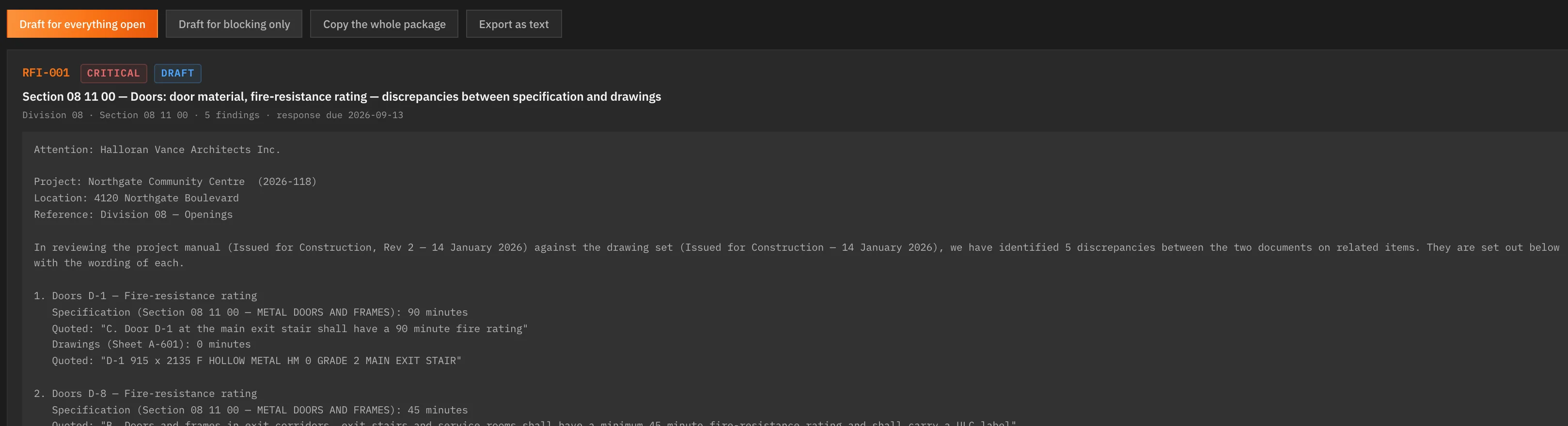
- The spec book read against the drawing set, so the conflict that produced the RFI is found before anybody writes it — both statements, both references, and the RFI drafted for you.
- Drawing sets uploaded as PDF or DXF, including the scanned sheets that came back from the printer as flat images.
- Findings exported as a Procore-shaped issue import CSV, so the official record stays in Procore.
- Every finding carrying the sheet and clause it came from, which is what makes a drafted RFI defensible rather than plausible.
Be clear about the shape of it: this is not a Procore app and nothing writes back automatically. You export a file and import it. What you get in exchange is a program that read the contract documents, which is the part Procore's AI does not do.
Honest cost comparison
Procore AI is bundled into your existing Procore tier or sold as a per-seat add-on. The economics scale with headcount; that's fine for a 10-PE shop and gets uncomfortable around 30-50 users.
Marapone is priced per firm rather than per head: $149 a month for one seat on two programs, $499 for all eight across up to five seats, $1,199 for up to twenty. Custom tuning on your own documents is quoted separately from $4,900. Against a per-seat add-on at 30+ users, the arithmetic separates quickly.
The right framing isn't "which is cheaper." It's "which is cheaper at your headcount" — a per-seat add-on grows with the team, a per-firm plan does not.
When you should use both
This isn't a binary choice. Running Procore AI inside Procore for the consultant-facing workflow and Marapone for the spec-book layer is a sensible arrangement. Marapone finds and drafts; you export the issue import CSV; Procore stays the system of record.
If you're already paying for Procore Copilot and the workflow gaps above are familiar, you don't have to rip anything out — you can layer.
The decision in two questions
- Does 80%+ of your RFI traffic happen inside Procore today?
- Are you OK with a per-seat subscription that grows with headcount?
Two yeses: stick with Procore AI, you'll be fine. Any no: fourteen free days on your own documents will settle it faster than another comparison article.
Try it on a backlog you know. Then judge the comparison yourself.
Run a real RFI batch through it yourself during the fourteen free days and compare it against whatever you use now — on your own jobs, with nothing metered.
Get the Comparison →