Skip to content
Marapone AI Estimator New

Takeoff measures.
This prices.

The Blueprint Auditor tells you there are 24,000 square feet of partition. The AI Estimator turns that into studs, board, tape, fasteners, waste and crew-hours — then adds the risk, the contingency, the Toronto soft costs and the margin you can actually win at. Runs entirely on your own machine — Windows or Mac. Bought once.

Runs offline Your data never leaves Stands alone or pairs with takeoff Windows & macOS · mobile coming soon
The real app, recorded · a 38-unit Toronto infill priced end to end

57

Parametric assemblies

Across 20 CSI divisions

27

Risk rules

Each with a cited reason

25

Requirement types read

From specs, ITBs and addenda

4,000

Monte Carlo iterations

Per cost distribution

Two tools, one pipeline

This is not a takeoff tool.

Takeoff and estimating get sold as one thing and they are not. Measuring is a geometry problem. Pricing is a judgement problem. We built them as two products so you can buy the one you are missing — or wire both together and never retype a quantity again.

Upstream

Blueprint Auditor

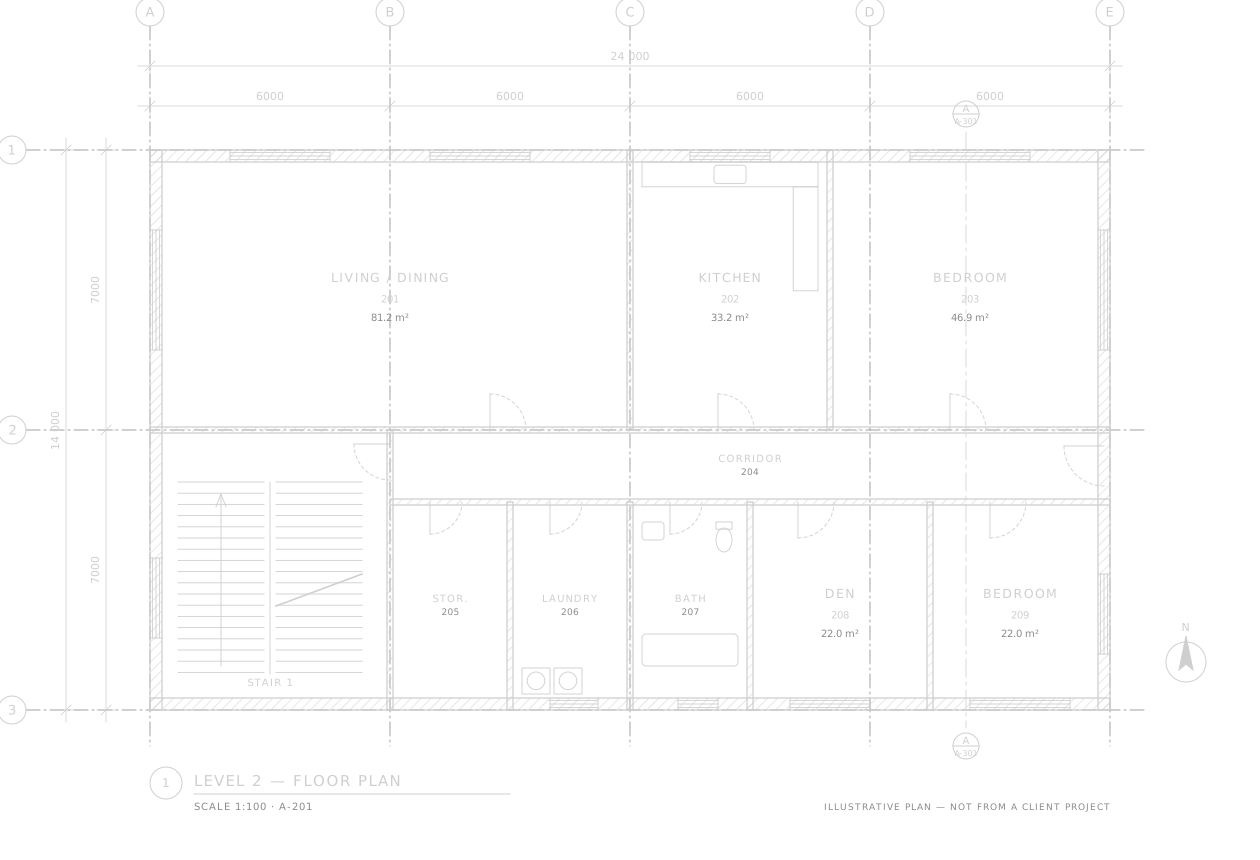
Reads the drawing set and answers how much is there.

  • Quantities measured off the sheets
  • Scope gaps and drawing conflicts
  • Code and tender risk flags
See the auditor →
Downstream

AI Estimator

Takes those quantities and answers what should we bid.

  • Assemblies, waste factors and crew-hours
  • Contingency sized to the actual risk
  • Permits, DCs, HST and the margin call
You are here

Either one works on its own. Already have takeoff you trust? Import a CSV or Excel sheet of quantities and the estimator never needs the auditor. Already price by hand and only want the measuring done? Buy the auditor alone. Most teams end up running both — because the seam between them is where quantities get retyped and errors get born.

Inside the app

Every screen, no mock-ups.

Everything below is the shipping application priced against one real job: a four-storey, 38-unit residential infill on Lakeshore Blvd West — 42,000 SF, 15 months, constrained site, winter start.

01 — Risk & contingency

The number under the number.

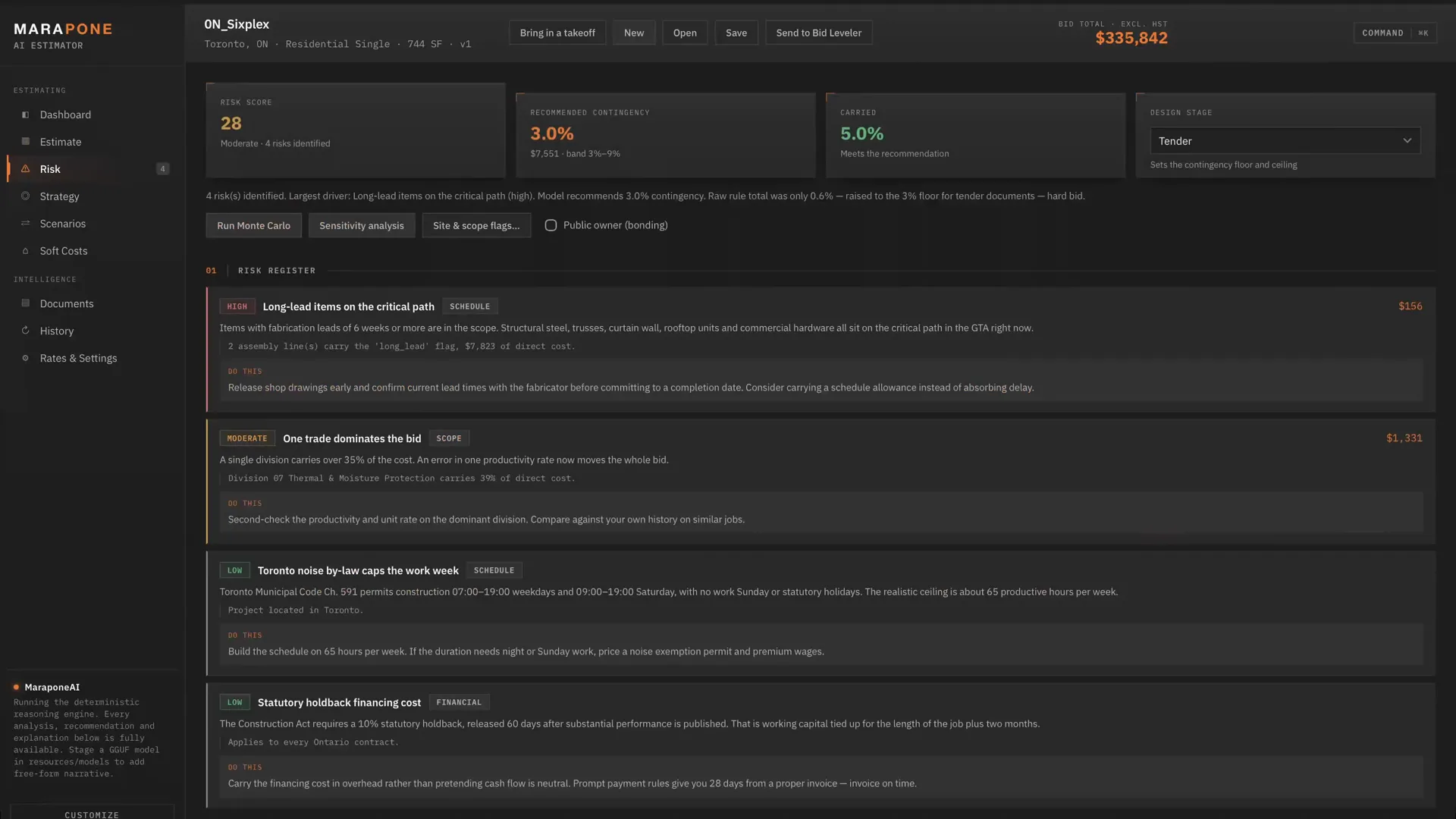
27 rules across scope, schedule, market, site, regulatory, design and financial exposure. Each one that fires gets a written reason, a dollar exposure and a mitigation — not a colour-coded dot.

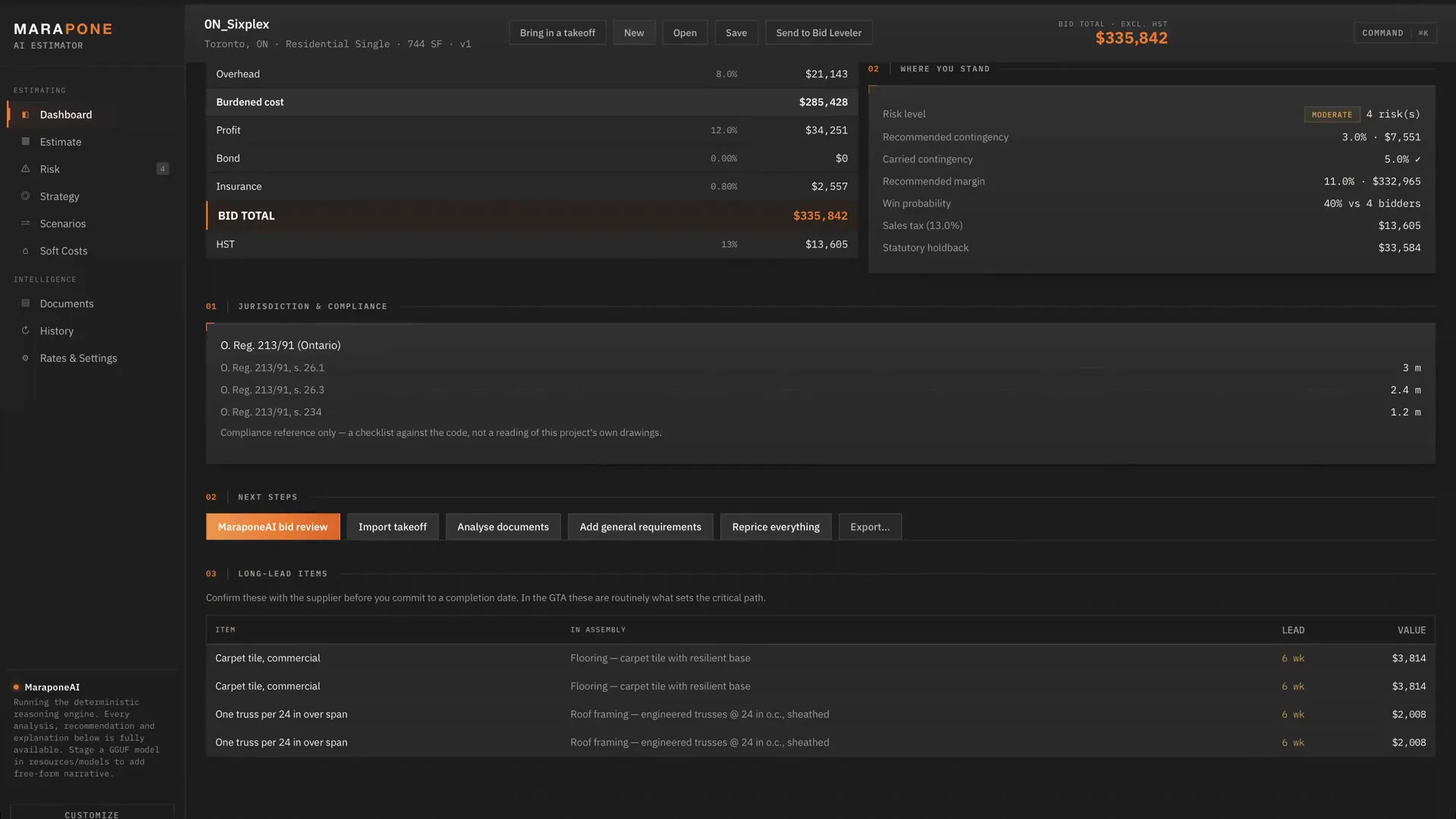
On this job the model wants 9.0% contingency. The bid carries 5.0%. That gap is $362,535 of unpriced exposure, and it is on screen before the bid goes out rather than in the post-mortem.

  • Contingency clamped into a band by design stage, so a pile of small flags cannot produce an absurd number
  • Confidence scored by division — you can see which trades are assumption rather than quote
  • Every rule cites the code, by-law or statute it comes from
02 — Bid strategy

Where to put the margin, and why.

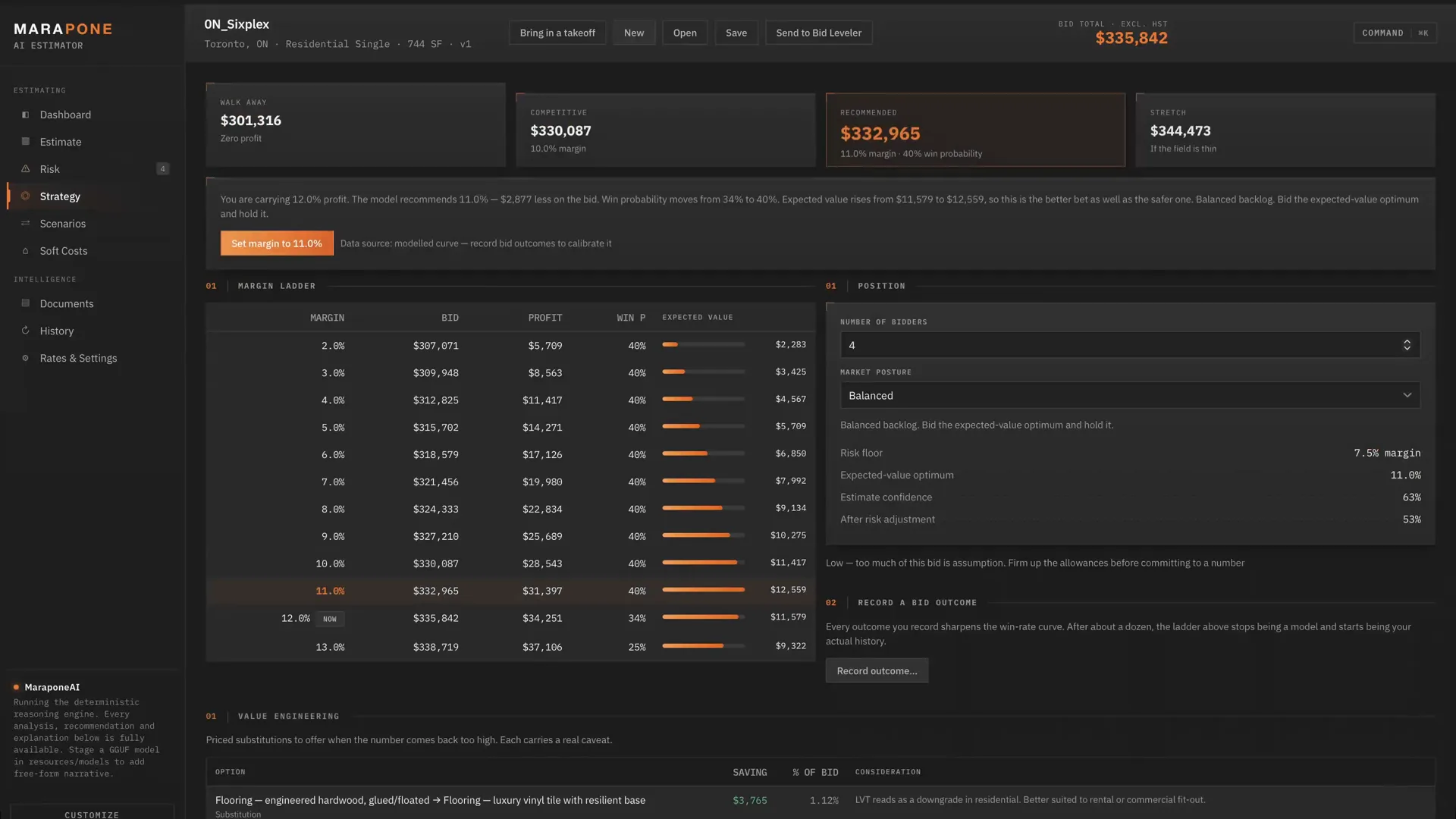
Four numbers every estimator has in their head and almost never writes down: the walk-away price, the competitive price, the recommended price, and the stretch. Here they are calculated — and the win probability behind them comes from your own recorded outcomes, not an industry curve.

  • Margin ladder with expected value at every rung — the pure EV optimum is often below where you want to be
  • A risk floor that refuses to let margin cover a risk that was never priced
  • Priced value-engineering options for when the number comes back too high
  • Record the outcome afterwards and the curve sharpens on the next bid
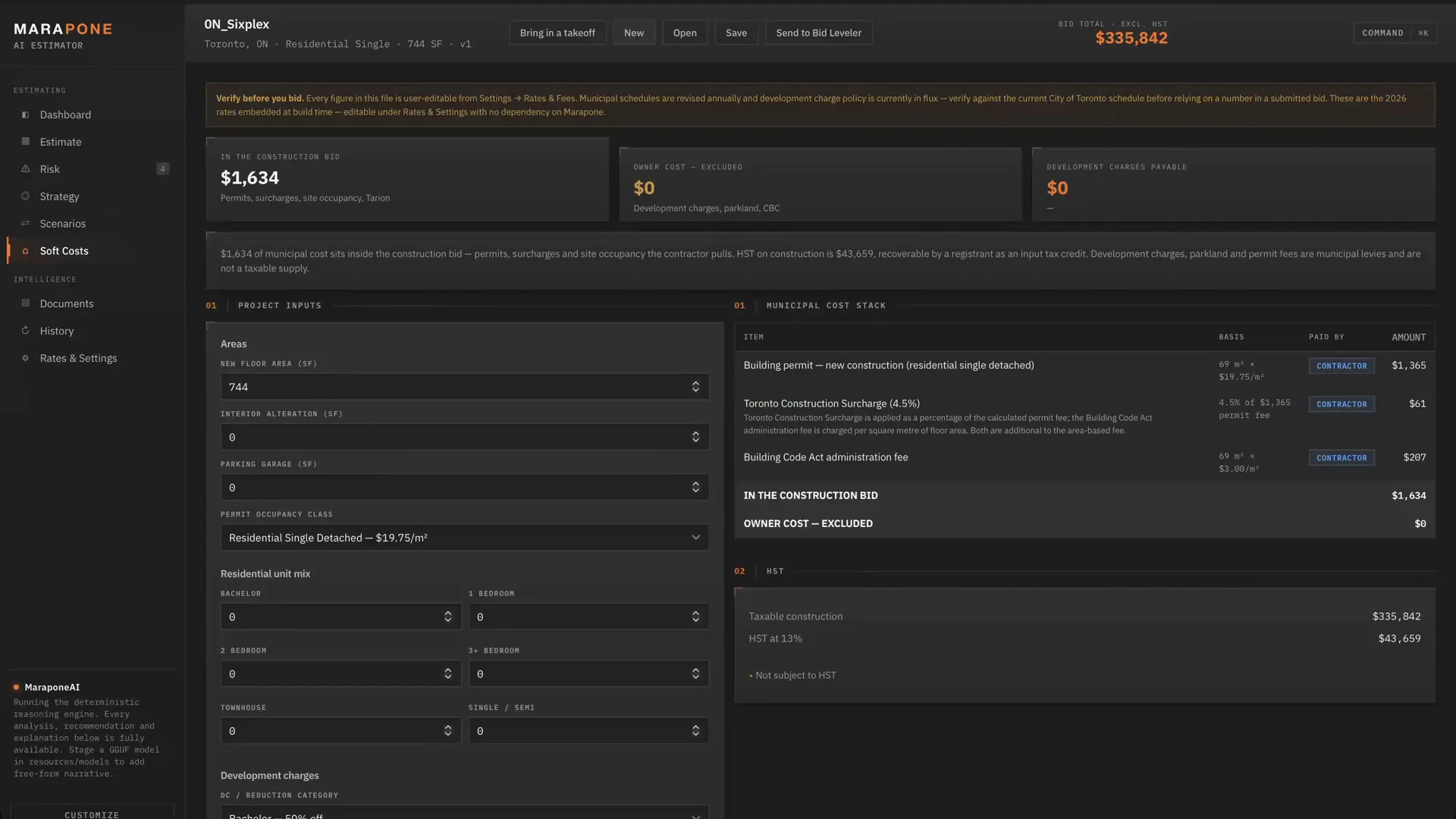
03 — Toronto soft costs

The line item that dwarfs the finishes.

On this project the development charges alone are $3,153,979 gross — reduced to $1,576,989 under the Canada–Ontario Development Charge Reduction Program. That is more than the entire interiors package, and generic estimating software does not know it exists.

  • City of Toronto 2026 fee schedule — area rates by occupancy, 4.5% Construction Surcharge, Building Code Act administration fee
  • Development charges gross and reduced side by side, with demolition credits
  • Parkland, Community Benefits Charge, HST at 13% and the new housing rebate
  • Every levy tagged CONTRACTOR or OWNER, so nothing lands in the bid that should not be there

Municipal schedules change annually. Every figure is editable in-app and stored in your own folder — no dependency on us to stay current.

04 — Document intelligence

The clauses that cost money.

The takeoff reads the drawings. This reads everything else that binds the price — specifications, instructions to bidders, addenda, geotechnical reports, emailed clarifications — and pulls out the 25 requirement types that actually carry cost or risk. Three documents on this job produced 26 requirements.

  • Bonding, insurance, liquidated damages, holdback and prompt payment
  • Fair wage, phasing, restricted hours, road occupancy, sole-source products
  • Toronto Green Standard, green roof, heritage, tree protection, excess soil
  • Each finding shows the excerpt it came from, and converts to a qualification, a risk flag or a markup change with one click
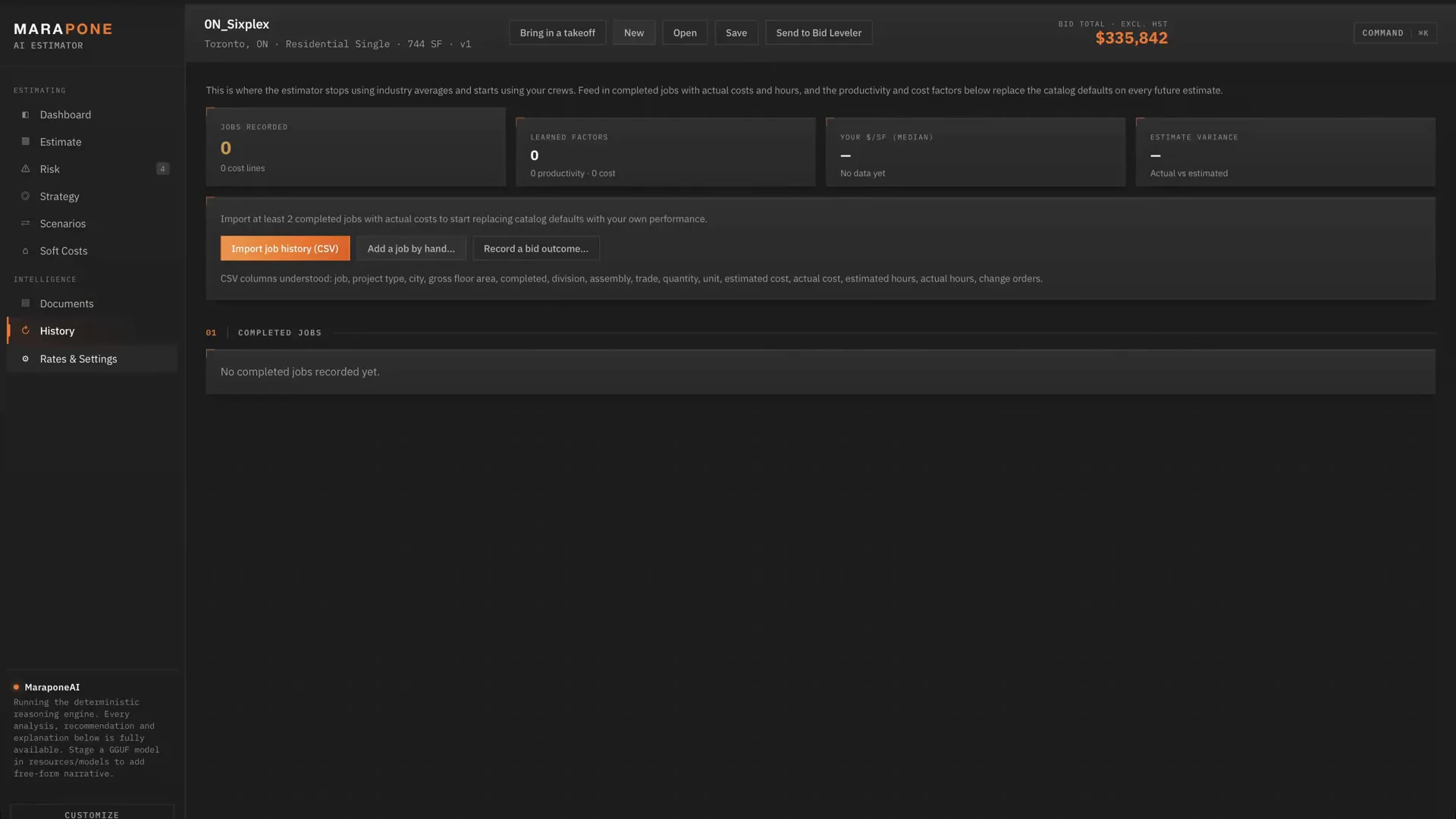
05 — Learning from your jobs

It stops using averages and starts using your crews.

Feed in completed jobs with actual costs and hours. The catalog defaults get replaced by what your people actually do: drywall running 14% over, carpentry 10% under, finishes consistently 7% hot. Those factors then apply to every future estimate automatically.

  • Factors are shrunk toward 1.00 by sample size — two jobs get a quarter of the signal, eight or more get all of it
  • One bad job never permanently distorts your pricing
  • Learned at assembly, trade and division level, whichever has the evidence
  • Import from CSV, or add a job by hand in a minute

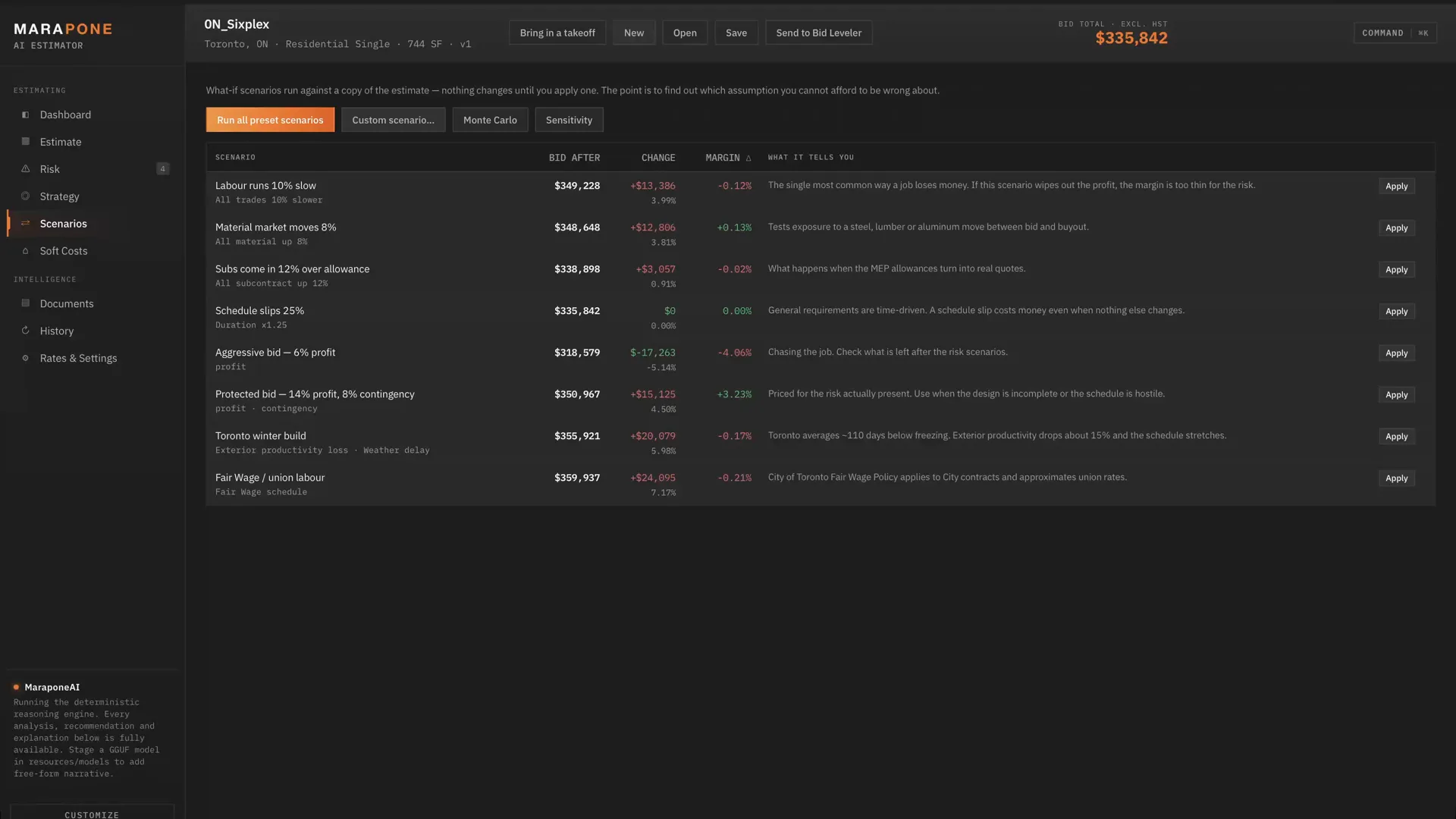
06 — What-if & Monte Carlo

Eight preset stress tests, custom levers, tornado sensitivity, and a probabilistic cost distribution that answers the only question that matters at 2 a.m.: what is the chance this job loses money. Scenarios run against a copy — nothing moves until you apply one.

07 — The estimate itself

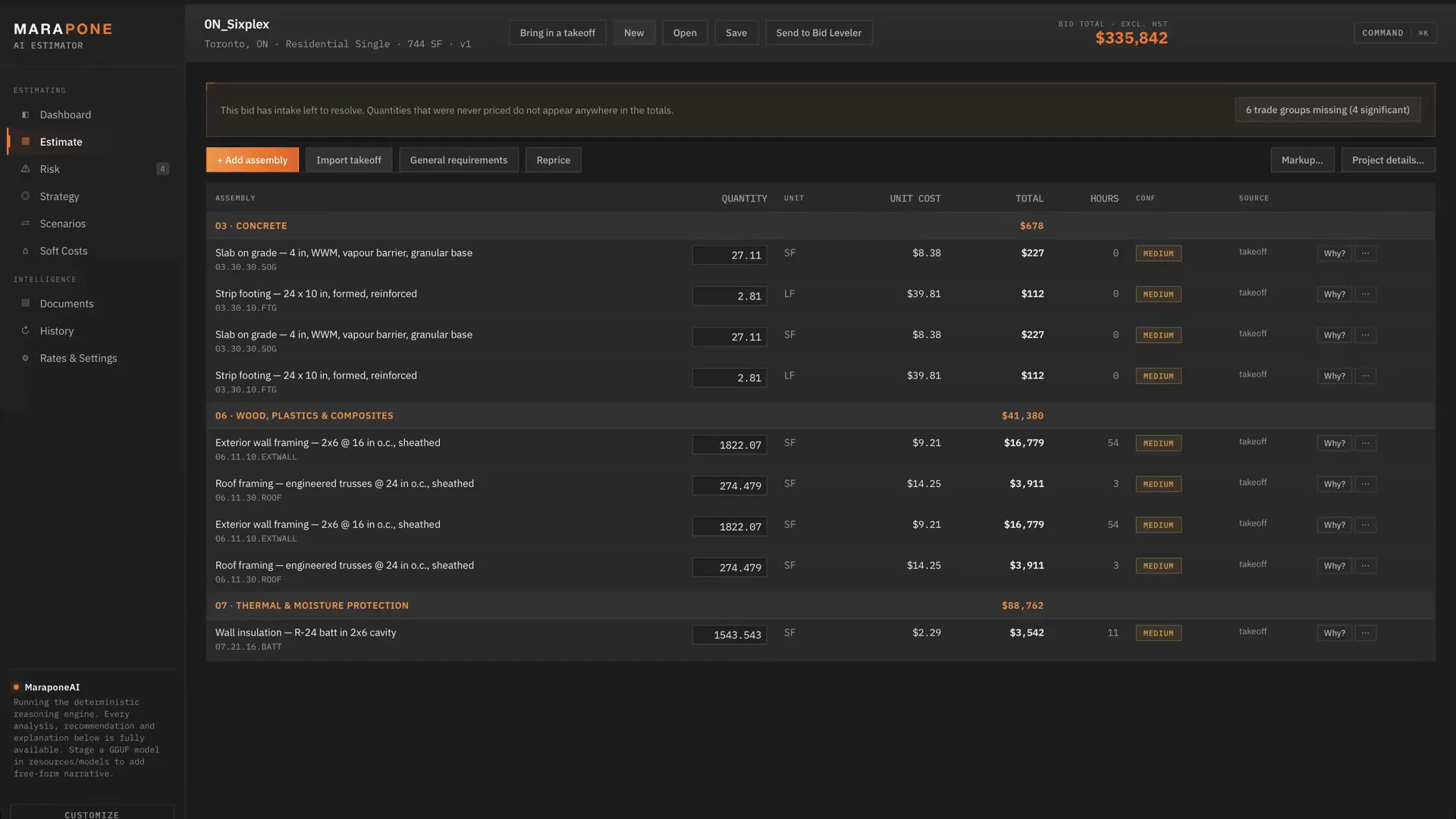
Every assembly expanded to its components, grouped by CSI division, each line traceable back to the catalog entry, your rate sheet or the drawing it was measured from. Override any price and it locks — repricing will not quietly overwrite a number you know to be true.

Built for one jurisdiction, properly

Toronto, not "North America".

Generic estimating software is accurate everywhere and therefore precise nowhere. This one ships tuned to the City of Toronto and Ontario — because that is where the money actually leaks, and because a finished pack is the only honest way to show the depth is real.

Every number below lives in a JSON file you own, with its citation attached. It is the default pack, not the only one.

Building code

2024 Ontario Building Code (O. Reg. 163/24, in force 1 Jan 2025), SB-12 Zone 6 energy packages, 1.2 m frost depth, AODA barrier-free requirements.

Payment & statute

Construction Act (Ontario) — 10% statutory holdback, 28-day prompt payment, s. 85.1 bonding thresholds on public work.

Permits

City of Toronto 2026 fee schedule — $214.79 minimum permit, $92.79 hourly examination, area rates by occupancy, 4.5% Construction Surcharge, $3.00/m² Building Code Act administration fee.

Development charges

Canada–Ontario Development Charge Reduction Program (40–60% off, from March 2026), demolition credits, gross and reduced shown side by side so the exposure if eligibility fails is never hidden.

Tax

HST at 13%, shown separately and never buried in a unit rate, with input tax credit treatment and the federal plus Ontario new housing rebate.

Municipal

Toronto Green Standard v4, green roof by-law Ch. 492, ravine and tree protection Ch. 658/813, Ontario Heritage Act, and excess soil under O. Reg. 406/19.

Schedule

Noise by-law Ch. 591 — durations built on the roughly 65 productive hours a week Toronto actually permits, not a seven-day assumption.

Labour

GTA labour benchmarks and market conditions as at mid-2026, used to validate imported rates and drive escalation — flagged for a second look, never silently corrected.

Building somewhere else?

None of the above is compiled into the engine. Tax, holdback, permit fees, code references and winter productivity are sections of a jurisdiction file; the 95-item material catalogue, 24 crew compositions and the city cost index are separate files again. Swapping market is a data edit, and after handover you can make it yourself.

How regions & rate packs work →
MaraponeAI

The model never decides a number.

This is the part most AI estimating tools get backwards. Prices come from the catalog and your rate sheet. Factors come from your job history. Contingency comes from the risk rules. The bid range comes from the strategy engine. All of it is deterministic and all of it is traceable.

MaraponeAI explains, summarises and drafts. It does not price. Every figure it quotes traces back to the audit trail — which is what makes the estimate defensible to an owner, and what stops a 30-year estimator from writing the whole thing off as a black box.

Even the conversational layer is deterministic. Type tighten drywall productivity 8% and show me the impact and it is parsed by rule, previewed before it moves a cent, and logged in the change history. An estimator typing an instruction about money needs it executed exactly — a misread intent that silently shifts a bid is far worse than an honest "I did not understand that".

Runs entirely on your machine

A native desktop app for Windows and macOS, with mobile versions coming. Drop an embedded model into the app's own folder and nothing leaves the machine, ever. No account, no cloud, no telemetry, no per-seat licence phoning home.

Fully functional without a model

Every analysis, recommendation and explanation is available from the deterministic reasoning engine alone. Without a model you lose free-form narrative — you do not lose a single number.

Your data outlives the software

The database, rate overrides, job history and fee-schedule edits live in your own Application Support folder in open SQLite. An app update never touches them, and you can read them without us.

Built by the people who made this page

The app and this website are the same design language on purpose — the same orange, the same mono type, the same dark plate. Estimating software usually looks like it was assembled by a different company than the one selling it. Ours doesn't, because it wasn't.

Exports into what you already run

Client proposal PDF, internal bid review PDF, Excel workbook, and CSVs for Procore, Sage, QuickBooks and Bluebeam, plus a buyout list. Client-facing and internal documents are deliberately separate — handing a client your margin ladder is a bad afternoon.

From drawings to submitted bid

Eight steps, and the last one matters most.

01

New estimate

Project, postal code, type, area, duration, site conditions.

02

Import quantities

Blueprint Auditor JSON, or any CSV/XLSX. Metric converts automatically. Anything it cannot confidently match is surfaced, never guessed.

03

Import your rates

Your rate sheet becomes the primary source. Rates well outside the GTA benchmark get flagged, not corrected.

04

Analyse documents

Findings become qualifications, risk flags and markup changes you apply with one click.

05

Review the risk

Risk register, contingency gap, Monte Carlo, sensitivity.

06

Position the bid

Margin ladder, win probability, value engineering, walk-away number.

07

Export

Proposal PDF, internal review PDF, Excel workbook, integration CSVs, buyout list.

08

Close the loop

Record the outcome and the actual costs. The next estimate is measurably better because of it — this is the step everyone skips and the only one that compounds.

The output, not a screenshot of it

Read the bid it wrote.

Both documents below came out of the app on the Lakeshore Yards job you have been looking at — no editing, no cleanup. They are the fastest way to judge whether this thing actually understands construction. Open them before you spend anything.

Also exports an Excel workbook, a buyout list, and CSVs for Procore, Sage, QuickBooks and Bluebeam.

What $990 actually buys

A finished application, not a licence.

One payment. No seats, no renewals, no metering, no expiry. The working app on day one, the full source code on day 31 — and a refund in between if it doesn't earn its keep.

The arithmetic

On the demo job the risk engine wanted 9.0% contingency against the 5.0% the bid carried — $362,535 of unpriced exposure, on screen before the bid went out instead of in the post-mortem.

The software costs $990, once, and prices every bid after that one. One tender where it moves the margin call, or catches a division priced on an assumption, has already paid for it several hundred times over.

Included in the $990

  • The complete application on day one — installed on your own machines, no licence key, no activation server, no expiry
  • Unlimited bids, projects, documents and machines in your company. No per-seat or per-project fee, ever
  • All 57 assemblies across 20 CSI divisions, 27 risk rules, the Monte Carlo and sensitivity engines and the margin ladder
  • Every rate and fee schedule editable in-app — your labour rates, your productivity factors, your Toronto charges
  • Proposal PDF, internal review PDF, Excel workbook and Procore / Sage / QuickBooks / Bluebeam exports
  • Full source code on day 31, once the refund window closes
  • 30-day refund in full if it doesn't save you 10 hours — how that works

Not included — that’s a custom build

From $1,500 · most land $4,900–$9,500

  • An assembly catalogue rebuilt around how your company builds, or divisions you self-perform and price your own way
  • A soft-cost and by-law layer for a municipality outside Toronto and the GTA
  • A live link into Procore, Sage, your ERP or your own cost database (the exports are files, not integrations)
  • Workflows the product doesn’t cover — RFI backlogs, daily logs, deficiency lists, change-order tracking
  • Ongoing development after handover (optional support plans, never required)

Buying the product first doesn’t lock you out of a build later — most teams start here, then commission the parts that are specific to them. See custom builds →

Separately, or together

Buy the piece you're missing.

Both are one-time purchases with the source code included. No seats, no renewals, no metering. Full pricing lives on the pricing page — this is how the two products fit together.

Option A

Estimator alone

You already have takeoff you trust — a measuring service, Bluebeam, or an estimator with a scale rule. Import a CSV of quantities and get the pricing, risk, soft costs and strategy layer on top.

Best for: estimators who measure fine and price by gut

Option B

Auditor alone

Your pricing is dialled in and the bottleneck is measuring and reviewing drawings. Run the Blueprint Auditor for takeoff, scope gaps and tender risk, and keep pricing the way you always have.

Best for: teams drowning in drawing review

Option C — most teams

All three, wired together

Quantities flow from the drawings into the priced bid, and the priced bid becomes the budget ScopeGuard measures every subcontractor's letter against. The seams between measuring, pricing and buying out are where errors get born — this removes them.

$2,490 for the suite · saves $480

Price your next bid with it.

Send us a real job — quantities, drawings, or just the tender documents. We will run it through the estimator and walk you through what it found, line by line, before you spend anything.

One time · +HST · Secured by Stripe · 30-day refund · source code on day 31

// For the person who has to sign off on it

The technical detail, before you ask for it.

Every claim on this page has a page behind it. No form, no call — read it now.