Skip to content
Marapone ScopeGuard New

You won the job.
Now don't give it back.

Twenty trades quote your job and twenty estimators write their own exclusions. Somewhere in that pile is work the specification requires that nobody priced, work two trades are both carrying, and wording that will be read against you in an adjudication. ScopeGuard reads all of it against the master documents and puts a number on every gap — before you award, not after. Runs entirely on your own machine. Bought once.

Works with the wifi off Every finding cited on both sides PDF, Word, Excel, CSV or a saved email Windows & macOS · mobile coming soon
The real app, recorded · sixteen real documents, fourteen subcontractor proposals, one $14.25M buyout

215

Master scope requirements

Across 20 trade packages, mapped to CSI

22

Interface conditions

The grey zones between two trades

18

GTA dispute hotspots

Frequency, exposure and prevention

8

Finding types

Each with a citation on both sides

What buyout actually is

Fifteen letters. One afternoon. Days before award.

What comes back from the trades is prose — inclusions, exclusions and qualifications written by fifteen different estimators, each protecting their own number. Most GCs review it by hand, with a checklist, under time pressure.

The failure is never dramatic. It is one sentence in the concrete letter that puts winter heating on somebody else, on a job whose structure runs November to March. Nobody notices until the first cold morning, and by then the price is a change order rather than a negotiation.

Silence is the expensive part. The most costly item on a buyout is the one no letter mentions at all — so ScopeGuard reports absence as loudly as it reports a bad clause.

From the concrete proposal, as read

“Cold weather concreting including accelerator, insulated blankets, hoarding and supplementary heat — by others”
High Required scope excluded Concrete $118,320 – $201,840

Winter concreting — heating, hoarding, curing blankets, accelerator — excluded

Concrete Ltd. has explicitly excluded work that Section 03 30 00 — Cast-in-Place Concrete requires. Unless another trade has carried it, this work has no price behind it. Read from your specification at page 2.

Master: Section 03 30 00 — Cast-in-Place Concrete · CSA A23.1 cold weather requirements; GTA Dec–Mar
Proposal: 04-CONC_Vaughan_Forming_scope.pdf p. 1 — Exclusion
Confidence 95% · Basis: 1,450 m³ × $96.00 — cold-weather premium (Toronto 2026 rate table)

One finding out of 120 on the demo buyout. Nothing here is written by a model.

Three tools, one job

Measure it. Price it. Then buy it out.

These are three products because they are three different problems, and most contractors only have one of them. Buy the one you're missing — or run all three and the same job carries straight through from the drawing set to the awarded subcontract.

Stage 1

Blueprint Auditor

Reads the drawing set and answers how much is there — quantities, scope gaps, code and tender risk.

See the auditor →
Stage 2

AI Estimator

Takes those quantities and answers what should we bid — assemblies, contingency, Toronto soft costs, margin.

See the estimator →
Stage 3

ScopeGuard

Takes the awarded job and answers did anyone actually price it — every sub's letter against your own documents.

You are here

ScopeGuard stands alone. It needs your tender package and the letters that came back — nothing else. If you do run the estimator, its division rollup drops in as the budget each trade is measured against, and the demo on this page is the same Toronto job the estimator prices, carried one stage further.

What it looks for

Eight ways a buyout leaks.

Every finding carries a plain-language explanation, a citation on both sides — the clause in your master documents and the page and line in the sub's letter — a confidence score, and a cost exposure range with its stated basis. The counts below are what the demo buyout actually produced.

Required scope excluded

Required by the master documents, and the sub explicitly took it out. The fire pump, the winter heating, the fire alarm verification written as "by others".

44 · $2,048,687
Ambiguous language

Wording that will not survive a dispute — "as required", "standard", "allowance", "to suit". Twenty patterns that reliably become an argument.

42 · $446,278
Overlap / double coverage

Two or more trades carrying the same work. You pay for it twice, or you negotiate one of them down and give the other a reason to claim.

13 · $303,214
Interface / grey zone

Work in the gap between two trades. Carpentry says blocking is drywall's; drywall says it is carpentry's. Twenty-two of these recur on GTA jobs.

12 · $300,658
Addendum not carried

Priced against a superseded document. Four proposals on the demo job never acknowledged Addendum 3.

4 · $95,076
Pricing gap

A missing or unusable rate, or a price with a validity window that closes before your award date.

5 · $45,830
Missing scope

Required by the master documents and simply absent from the letter — not excluded, not mentioned. The one nobody catches by reading.

none on this job
House rule not met

Falls short of your own buyout standard — your blocking rule, your access-panel rule, your hoisting rule. You write these; they are checked on every letter after that.

none on this job

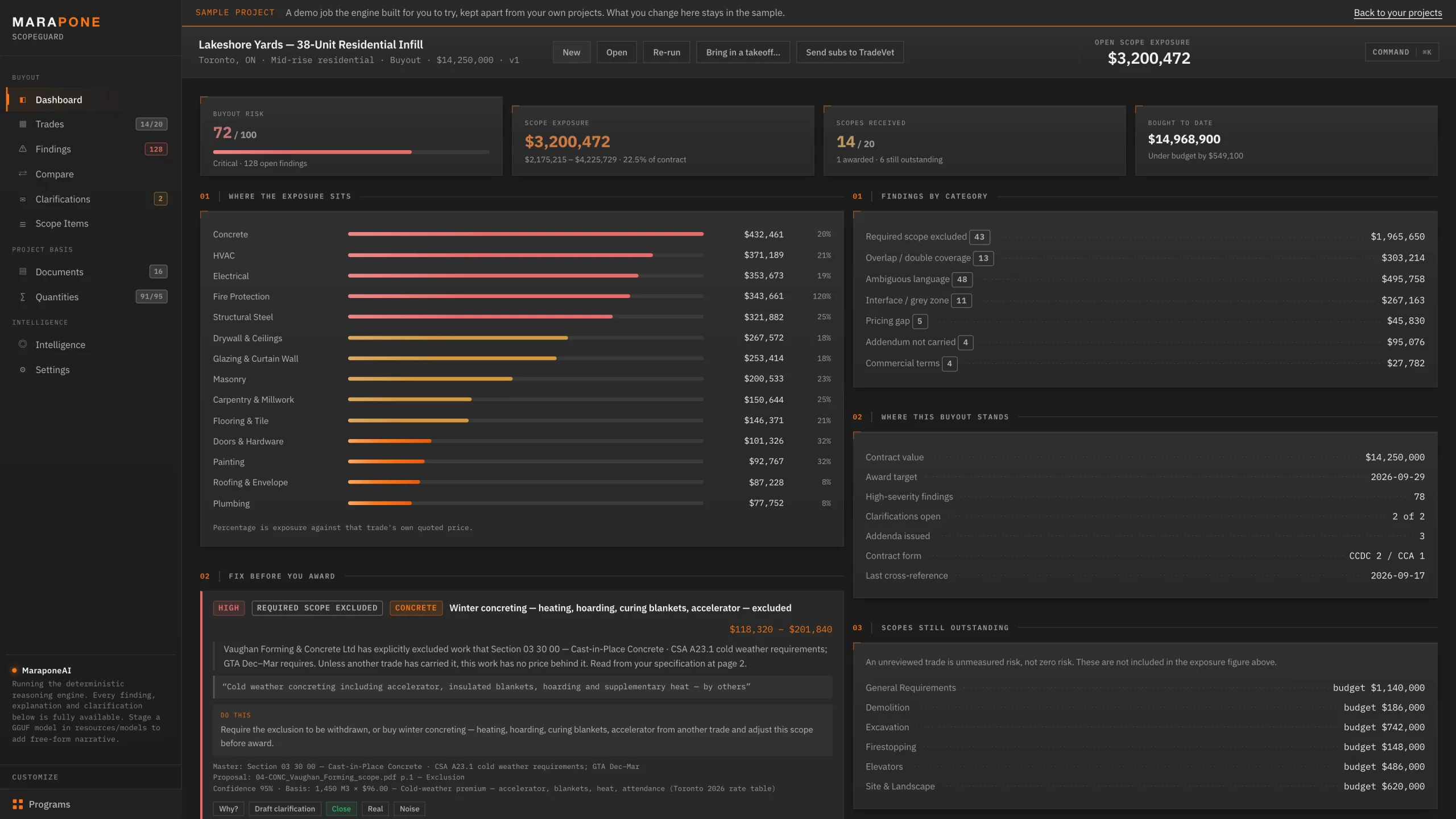
120 open findings, 75 of them high severity, $3,239,743 of mid-case exposure against a $14,250,000 contract — 22.7%. Sixteen documents, one afternoon of review compressed into the time it takes to make coffee.

Inside the app

Every screen, no mock-ups.

Everything below is the shipping application running one real buyout: Lakeshore Yards, a 38-unit residential infill at 118 Jefferson Avenue in Toronto — $14.25M, twenty trade packages, fourteen proposals received, a full project manual and three addenda. Nothing is canned. The reader, the extractor and the cross-reference engine are the ones your own documents go through.

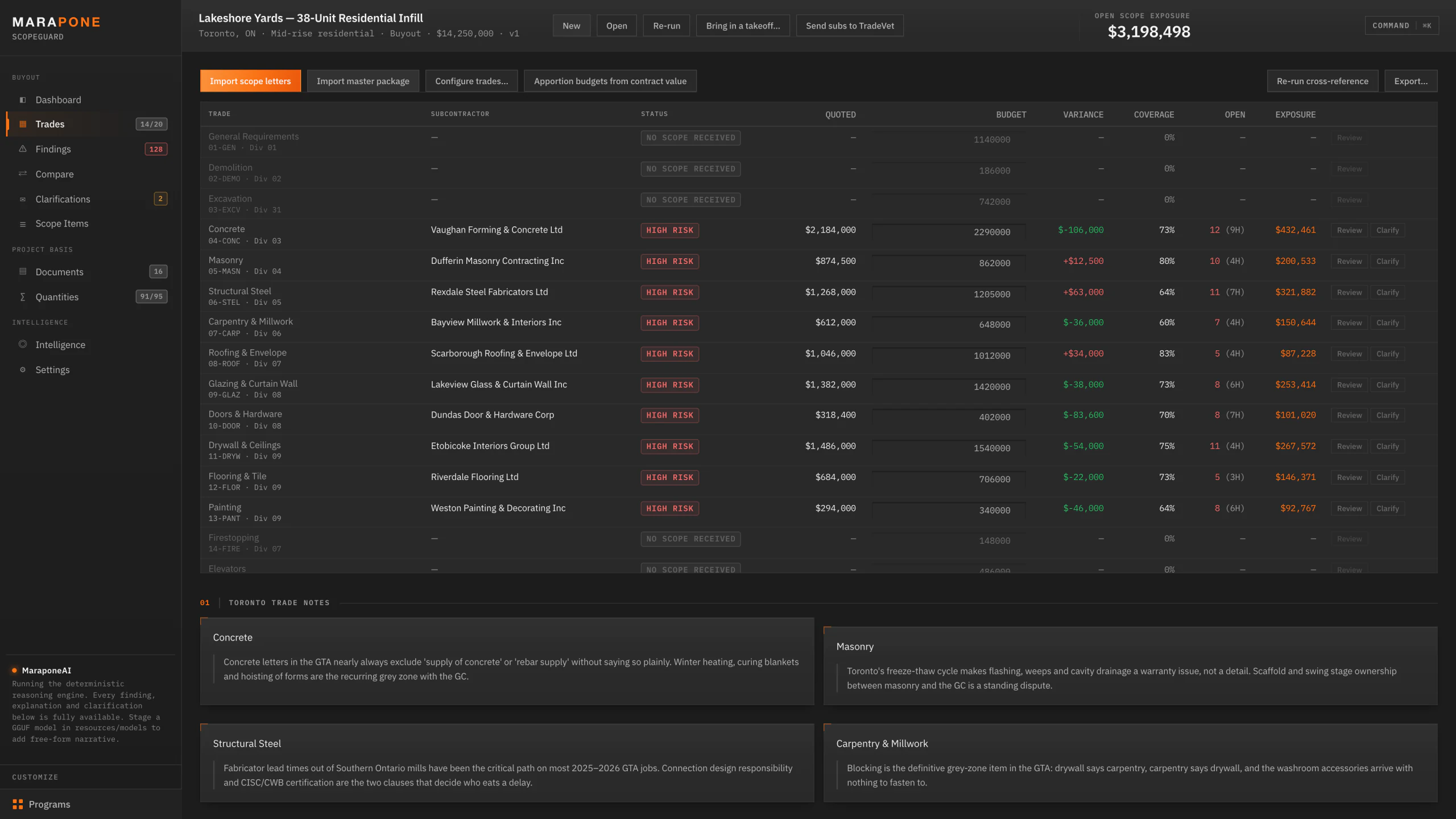
01 — Buyout dashboard

Where the money is leaking, ranked.

One screen answers the question you actually have: which trades to worry about, and how much. Exposure is shown per trade as a share of that trade's own quoted price — fire protection at 130% of its own quote is not a rounding error, it is a bid that priced a different job.

  • A single buyout risk score with the reasoning behind it, not a colour-coded dot
  • Trades still outstanding are listed separately and kept out of the exposure figure — an unreviewed trade is unmeasured risk, not zero risk
  • "Fix before you award" pulls the highest-exposure findings to the top of the page
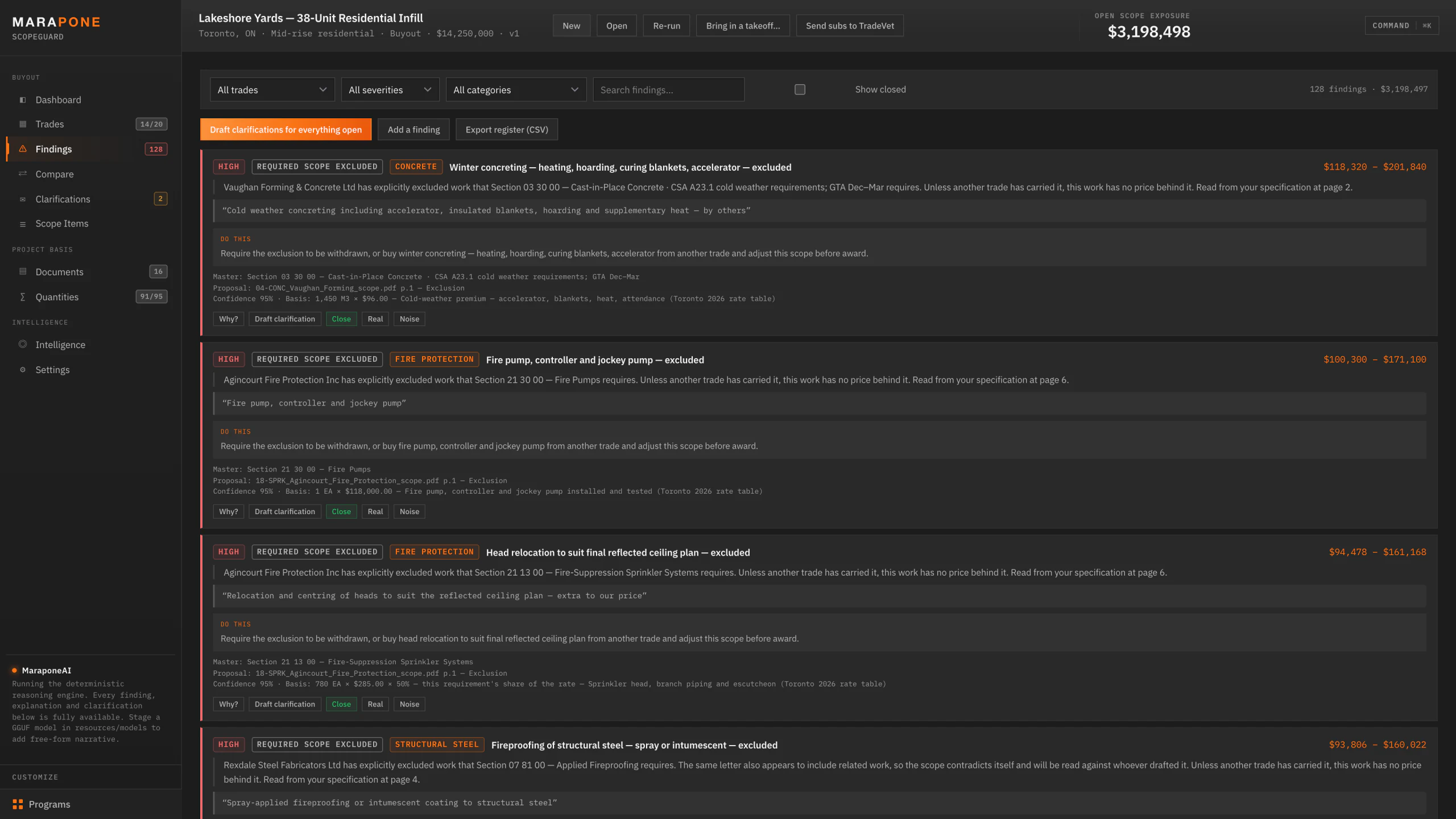
02 — The findings register

Cited on both sides, or it isn't a finding.

Every entry names the clause in your master documents that requires the work and the page and line in the sub's letter that deals with it. Below that: what to do about it, in a sentence you could paste into a letter. Ranked by severity, then by exposure.

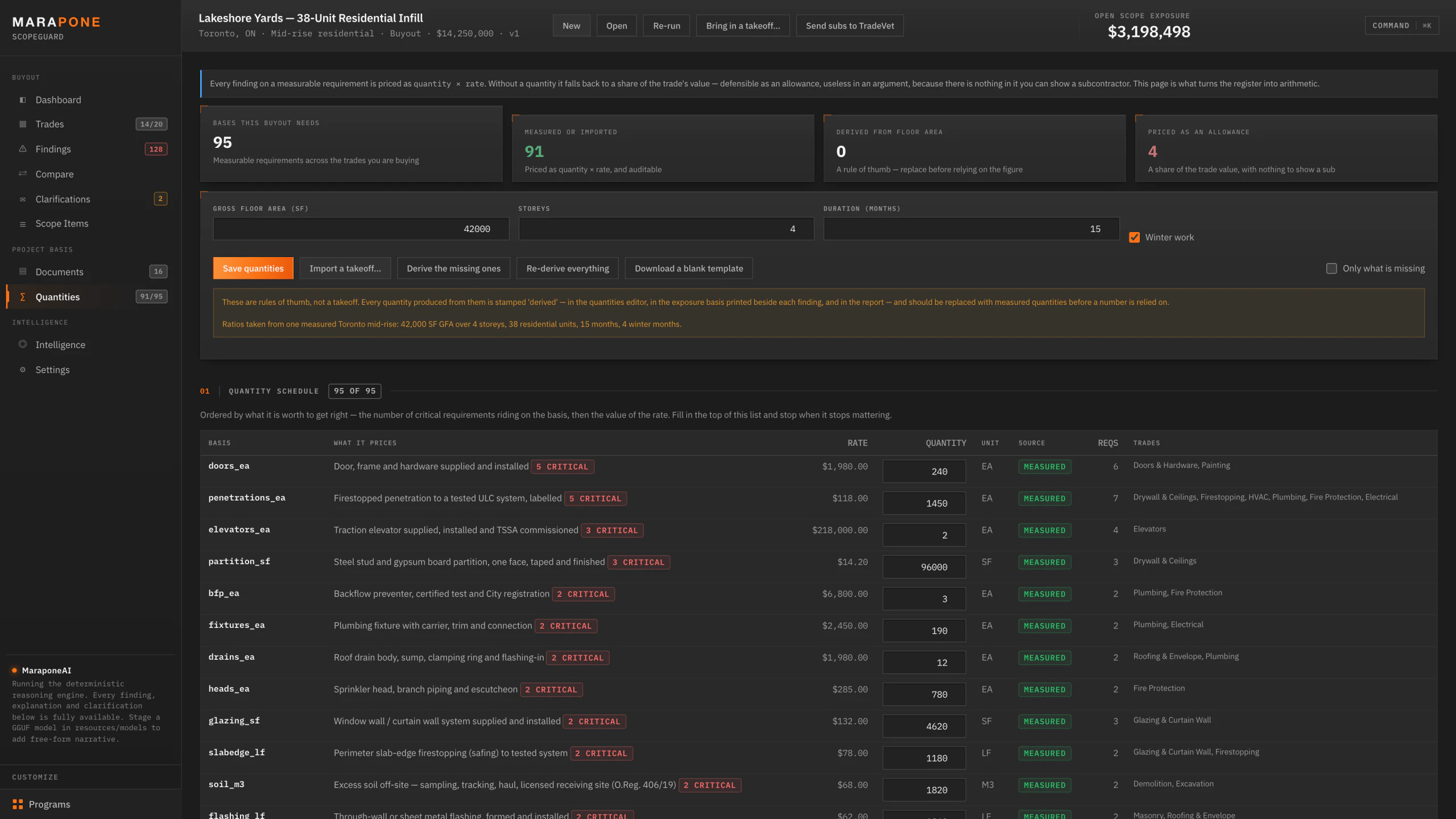
  • Every dollar figure states its basis — quantity, rate, and the share of that rate the requirement represents
  • The range is an argument, not a hedge: the low end is buying it cooperatively now, the high end is buying it as a change order after mobilisation
  • Mark any finding real or noise — that verdict persists and sharpens the next project
  • Filter by trade, severity or category; export the whole register to CSV
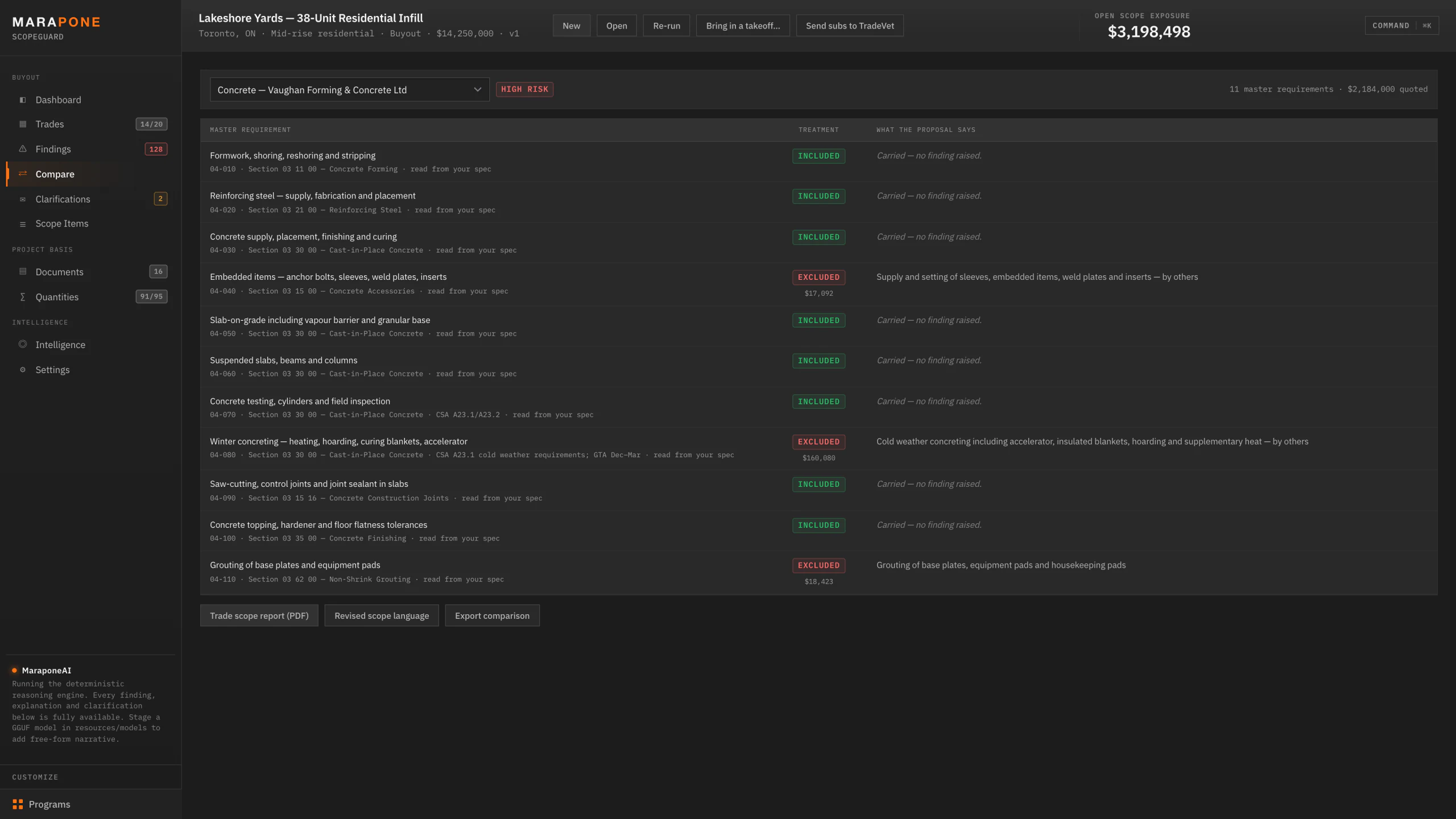
03 — Requirement vs. proposal

Your spec on the left, their words on the right.

The review a good estimator does in their head, written down. Every master requirement for the trade, its treatment in the letter — included, excluded, qualified or never addressed — and where a treatment costs money, the sub's own sentence quoted verbatim beside it.

  • Nothing paraphrased. The words you negotiate against are the words they wrote
  • Requirements with no finding are shown as carried, so the clean part of a letter is visible too
  • Exports as a per-trade scope report, or as revised scope language ready for the subcontract
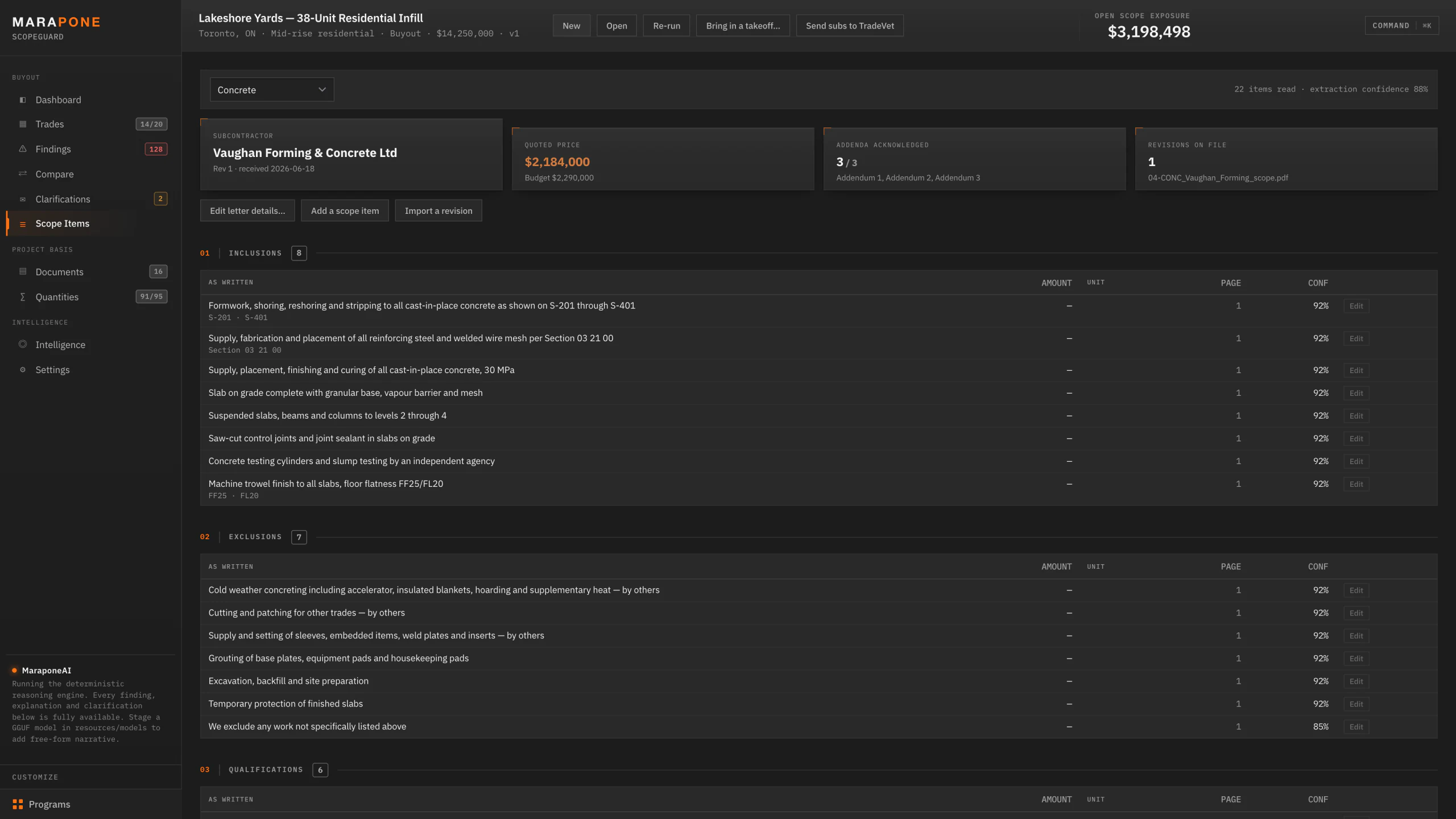
04 — Prose into structure

A scope letter is not a data format. It becomes one.

Drag the proposals onto the window — PDF, Word, Excel, CSV or a saved email. Each is read, classified by trade and split into inclusions, exclusions, qualifications, unit rates and alternates, with the page and an extraction confidence on every line.

  • Addenda acknowledged is tracked per letter — 3 of 3, or the gap that is about to cost you
  • Revisions stack: import Rev 2 and the register updates rather than starting over
  • Every extracted line is editable. The engine reads; you rule
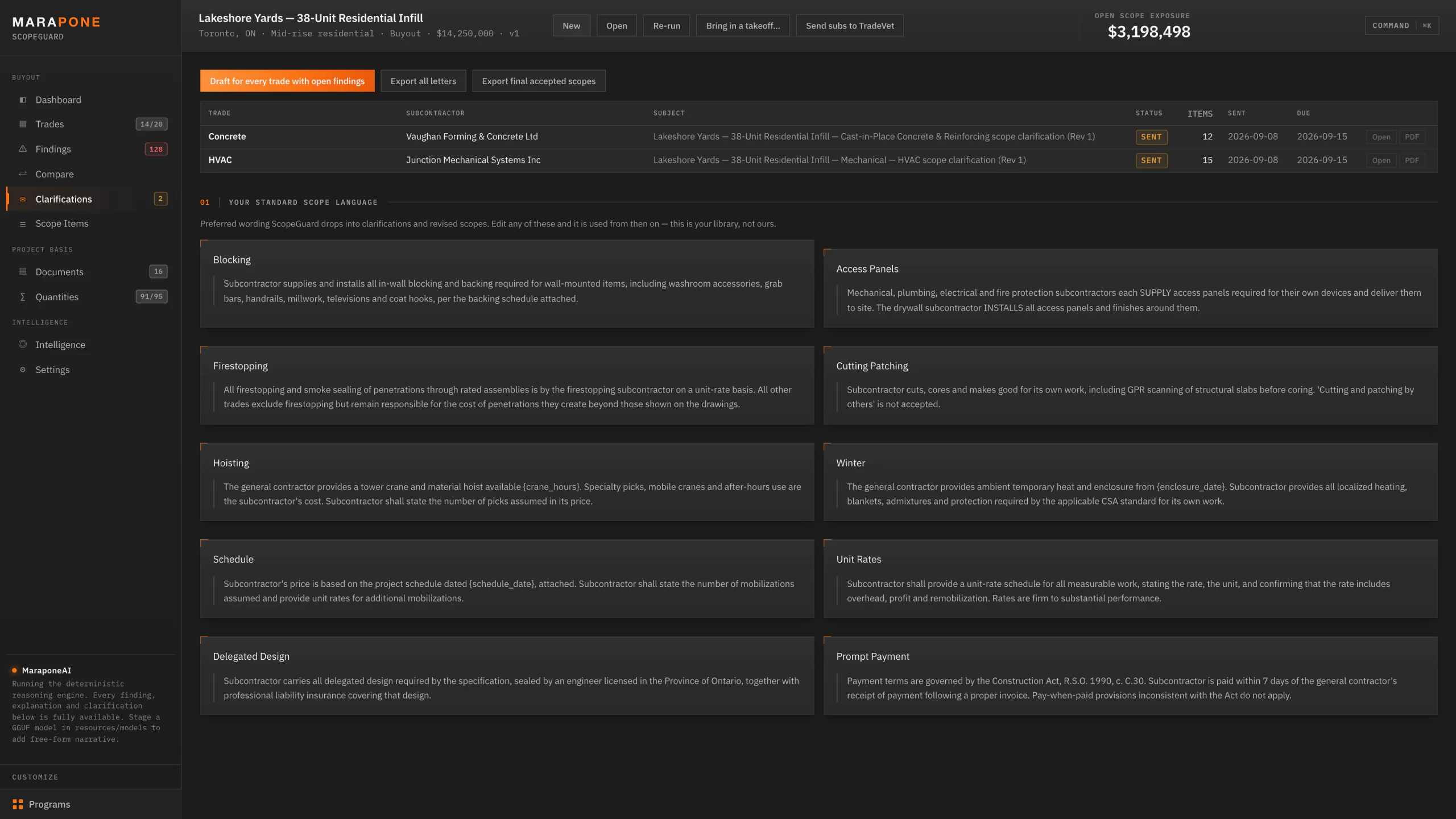
05 — Clarification letters

One click turns findings into the letter you'd have written.

Every open finding on a trade, numbered, each with the clause that requires the work and the exact question to put to the sub. Paste their reply back in and ScopeGuard reads what it actually did — which items were withdrawn, which were priced, and which were answered with more prose.

  • Draft for one trade, or for every trade with open findings at once
  • Your standard scope language — blocking, firestopping, hoisting, winter, access panels, cutting and patching — is a library you edit once and it is used from then on
  • Export the letters as PDF, and the final accepted scopes for the project file

06 — It learns your losses

Load your change-order history and the failures that actually cost you money get checked against every future letter. Alongside it: eighteen documented GTA dispute hotspots, and Ontario price movement by division — because a 30-day price on plumbing running 11.9% year-over-year is a buyout risk, not a formality.

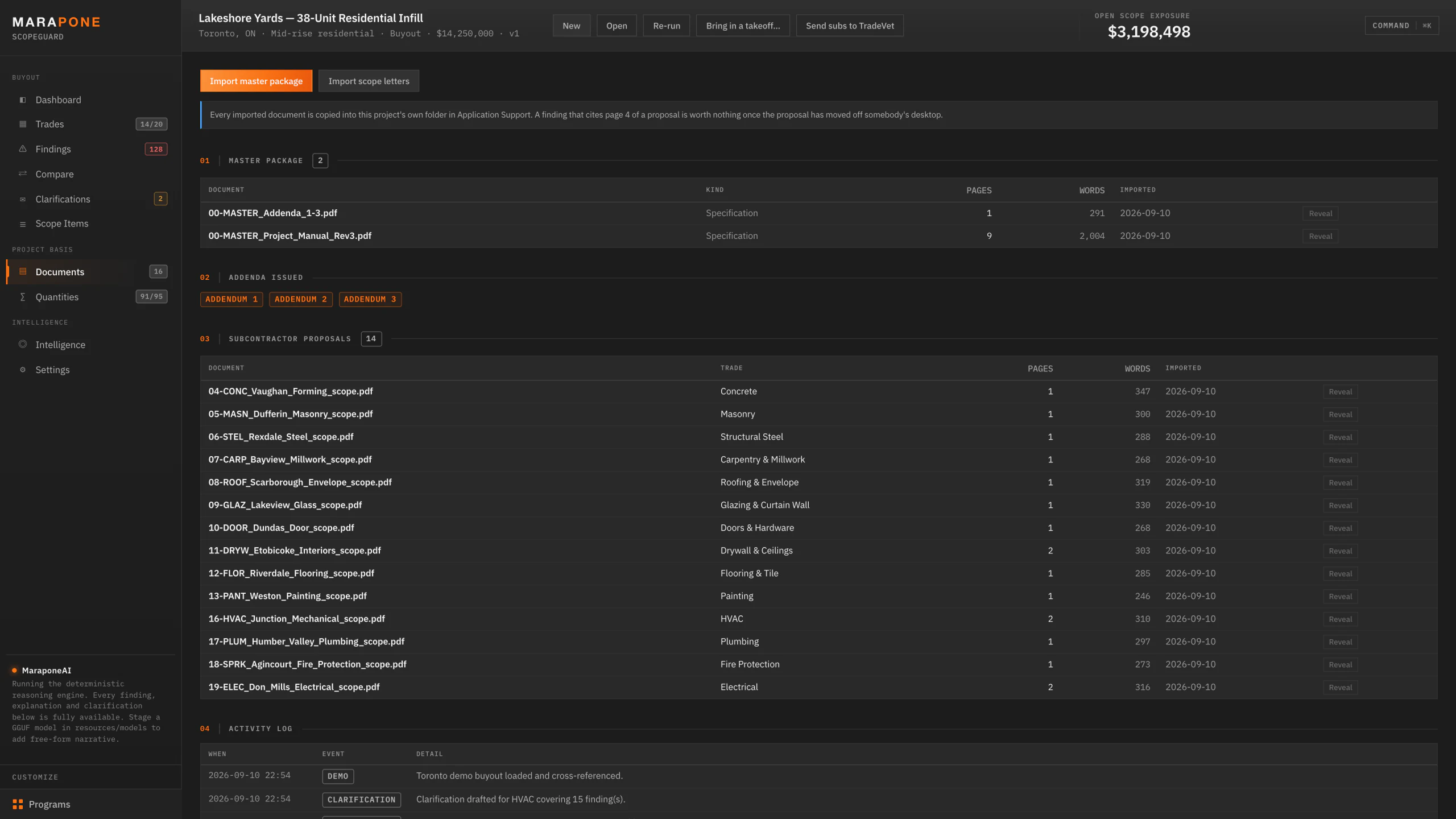
07 — The evidence stays with the job

Every imported document is copied into the project's own folder. A finding that cites page 4 of a proposal is worth nothing once that proposal has moved off somebody's desktop — so it doesn't. Master package, addenda and every proposal, kept where the citations still resolve.

Why the numbers hold up

A range you can't audit is a range you won't use.

Nothing is invented

Exposure comes from a Toronto subcontract rate table applied to your project's own quantities. Severity comes from requirement criticality and your own dispute record. Confidence comes from the match score. MaraponeAI explains, prioritises and drafts — it never decides a number.

Every figure states its basis

Each finding prints the quantity, the rate, the share of that rate the requirement represents, and the stage multiplier behind its number. You can check the arithmetic in front of the sub, which is the only reason a number is any use in a negotiation.

Silence is a finding

The most expensive item on a buyout is the one no letter mentions. Absence is reported as loudly as a bad clause — and trades that have sent nothing at all are listed by name, with their budget, so the hole is visible rather than implied.

You overrule the engine

Every finding can be dismissed, every extracted line edited, every rate overridden. Dismissals and overrides persist and compound: the second project is measurably quieter than the first because you taught it what noise looks like on your jobs.

Built for one jurisdiction, properly

Toronto, not "North America".

Scope disputes are local. The grey zones, the standard exclusions, the wording that gets used because it has worked on GTA jobs before — all of it is jurisdiction specific. This ships knowing ours, and every file below is plain JSON you own and edit after handover.

Trade packages

20 packages with 215 master scope requirements mapped to CSI MasterFormat, each with its typical share of contract value and a Toronto-specific note on where that trade normally leaks.

Interfaces

22 interface conditions — blocking, access panels, firestopping, backing, hoisting, cutting and patching, and the rest of the grey zones between two trades that recur on GTA jobs.

Language

20 language patterns that detect qualifications which will not hold up, plus the inclusion, exclusion and qualification cues that make extraction reliable on letters nobody formatted for a machine.

Dispute record

18 documented GTA dispute hotspots with frequency, typical exposure and the wording that prevents each one — checked against every scope you import.

Statute & contract

Construction Act (Ontario) holdback, prompt payment and adjudication; CCDC 2 with CCA 1 subcontract; 2024 Ontario Building Code.

Municipal

Toronto Green Standard v4, Green Roof By-law Ch. 492, Noise By-law Ch. 591, Sewer Use Ch. 681, Backflow Ch. 851, Tree By-law Ch. 813, O. Reg. 406/19 excess soil, O. Reg. 278/05 asbestos, and the ESA, TSSA and AODA gates.

Rates

Toronto 2026 subcontract rate table, revision 2026.1, in CAD excluding HST — the basis every exposure figure is calculated from, and editable line by line.

Market

Q4 2025 Ontario non-residential price movement by division, so a firm price shorter than the gap to your award date is flagged for what it is rather than assumed to hold.

The spine is CSI, not Ontario

All 215 requirements are indexed by CSI MasterFormat across 21 divisions — the taxonomy a US or Canadian estimator already reads. The Ontario layer is 59 local_ref entries and one note per trade, in named fields. Roughly three quarters of the knowledge base — hoisting responsibility, cut-and-cap, submittal cycles, as-builts — is disputed the same way on any job, anywhere.

How regions & rate packs work →
From award to signed subcontract

Six steps, and the fifth one is the product.

01

Create the project

Name, contract value, stage, award date. Every trade package is added with its budget apportioned from the contract value — or imported from the estimator's division rollup.

02

Import the master package

Specifications, drawing list, addenda. Spec sections are matched to trade requirements so every finding cites your documents, not a generic checklist.

03

Drop in the scope letters

Drag them onto the window. Each is read, structured and classified by trade automatically — no template, no naming convention, no data entry.

04

Review the findings

Ranked by severity then exposure. Mark each one real or noise; that verdict trains the engine for the next project.

05

Send the clarifications

This is the step that saves the money. Every open finding becomes a numbered question with the clause behind it — asked while the sub still wants the job.

06

Export and award

Buyout risk summary (PDF), a living register (Excel, seven sheets), a scope report per trade, the clarification letters, and the final accepted scopes for the project file.

MaraponeAI

The model never decides a finding.

A tool that hands you 120 findings has to be right about them, because the first hallucinated exclusion you take to a subcontractor is the last time anyone in your office opens the app. So the cross-reference engine is deterministic: requirement matching, treatment classification, overlap and interface detection, exposure and severity all run on rules and your own data.

MaraponeAI explains, prioritises and drafts. Every figure it quotes traces back to a clause, a page and a rate. Ask it show me everything over $50k on mechanical and the instruction is parsed by rule and previewed before it changes anything on screen.

It runs as a deterministic reasoning engine out of the box. Drop a model file into the app's own folder and it adds free-form narrative — still entirely on-device, still with the wifi off.

100% local, no exceptions

No network calls. It works with the wifi off. Your subcontractors' pricing is the most commercially sensitive data in your office and it never leaves the machine — no account, no cloud, no telemetry, no per-seat licence phoning home.

Fully functional without a model

Every finding, explanation and clarification is available from the deterministic engine alone. Without a model you lose free-form narrative — you do not lose a single finding or a single dollar figure.

Your data outlives the software

Documents, findings, clarifications, your language library and your dispute history live in your own Application Support folder in open SQLite. An app update never touches them, and you can read them without us.

The knowledge base is yours

Trade scopes, the interface matrix, the language patterns, the Ontario intelligence and the rate table are plain JSON in the app's resources folder. Edit them, extend them, keep them. Full source code is handed over on Day 31.

What $990 actually buys

A finished application, not a licence.

One payment. No seats, no renewals, no metering, no expiry. The working app on day one, the full source code on day 31 — and a refund in between if it doesn't earn its keep.

The arithmetic

One finding on the demo buyout — winter concreting excluded by the concrete trade, on a structure running December to March — carried $118,320 to $201,840 of exposure. It was one of 120 findings on one job.

The software costs $990, once, and runs on every job after that one. That is the whole value argument: you are not buying software hours, you are buying the finding you would otherwise pay for as a change order.

Included in the $990

  • The complete application on day one — installed on your own machines, no licence key, no activation server, no expiry
  • Unlimited projects, buyouts, documents and machines in your company. No per-seat or per-project fee, ever
  • All 215 master requirements, 22 interface conditions, 8 finding types and the Toronto 2026 rate table
  • The whole knowledge base as editable JSON — your trade scopes, your language, your rates
  • Full source code on day 31, once the refund window closes
  • Runs with the wifi off. Nothing about your subs' pricing leaves the machine
  • 30-day refund in full if it doesn't save you 10 hours — how that works

Not included — that’s a custom build

From $1,500 · most land $4,900–$9,500

  • Fine-tuning on your historical buyouts, your subcontract templates and your house language
  • A rate table rebuilt for a market outside the GTA, or for self-perform divisions you price differently
  • Wiring into Procore, Sage, Bluebeam or your own project database
  • Workflows the product doesn’t cover — RFI backlogs, daily logs, deficiency lists, change-order tracking
  • Ongoing development after handover (optional support plans, never required)

Buying the product first doesn’t lock you out of a build later — most teams start here, then commission the parts that are specific to them. See custom builds →

Or all three together: $2,490 — the Blueprint Auditor and the AI Estimator alongside this one, $480 less than buying them separately, plus one setup call that runs a real job of yours from the drawing set to the awarded subcontract.

Run it on the job you're buying out now.

Send us the tender package and the letters that came back. We will run them through ScopeGuard and walk you through what it found — finding by finding, with the clause and the page behind each one — before you spend anything.

One time · +HST · Secured by Stripe · 30-day refund · source code on day 31

Statutory and code references are costing inputs, not legal advice. Exposure figures are indicative ranges — confirm against live pricing before relying on them.

// For the person who has to sign off on it

The technical detail, before you ask for it.

Every claim on this page has a page behind it. No form, no call — read it now.